
Background Overview
I have a Logic App workflow where when triggered, it will deploy an Azure Container Instance based off of the latest image in Container Registry using action Create or update a resource group under Azure Resource Manager connector. The container is a one-time ETL run that gets destroyed once done. It was all working fine, but then I got a new requirement that the container instance must be CMK (Customer Managed Key) enabled.
Failed Attempts
I checked the ARM template for ACI group Microsoft Learn – Microsoft.ContainerInstance containerGroups and added the following properties to my ARM template:
"properties": {
  "encryptionProperties": {
    "vaultBaseUrl": "https://mykeyvault.vault.azure.net",
    "keyName": "acikey",
    "keyVersion": "xxxxxxxxxxxxxxxx"
},
under resources. I created this ACI key as RSA-HSM 4096 key in my private key vault. I triggered my workflow to run, but during the ARM template deployment, it gave the following error:
The key vault key is not found to unwrap the encryption key. (Code: MasterKeyNotAccessibleException)I googled this error, and only one relevant result came up, which was a thread in terraform github repository Github – Support for Container Group private Key Vault #19741.
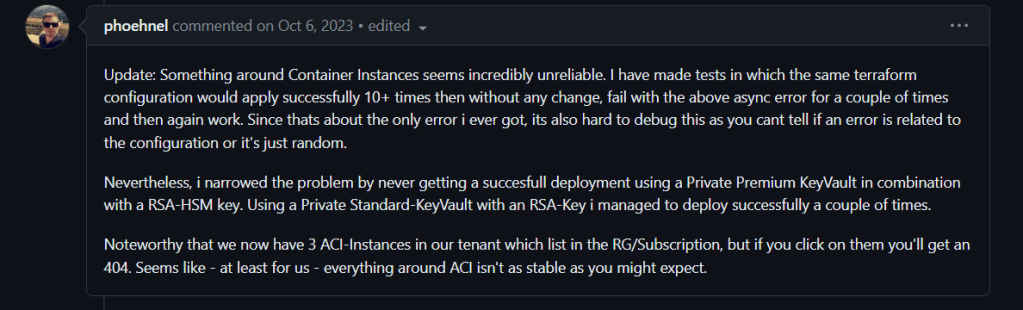
Based on this comment, I gathered that it might be the HSM key that is not working, so I changed that to RSA. Still the same error when reran.
The error message seemed to imply that it is some kind of permission issue, so I made sure that the Logic App that is calling the Azure Resource Manager has Key Vault Crypto User role in the private key vault. Still no luck.
Resolution
Then I saw this Microsoft documentation, where it illustrates exactly what I needed Microsoft Learn – Encrypt data with a customer-managed key in a network protected Azure Key Vault with Trusted Services enabled. I had to create User Assigned Managed Identity to be assigned to the to-be-deployed ACI. Referring to the above documentation, I performed the following steps:
- Create user managed identity in the same resource group
- Assign Key Vault Crypto Service Encryption User to the user managed ID above
- Modify ARM template’s apiVersion, identity property under container group properties, and identity object under resources Microsoft Learn – Modify Your JSON Deployment Template
I ran again and now I got a different error message:
The client '<logic app id>' with object id '<logic app id>' has permission to perform action 'Microsoft.ContainerInstance/containerGroups/write' on scope '<to-be-deployed aci>'; however, it does not have permission to perform action(s) 'Microsoft.ManagedIdentity/userAssignedIdentities/assign/action' on the linked scope(s) '<user assigned managed id>' … (Code: LinkedAuthorizationFailed).Now we made a progress! It sounds like my Logic App needs permission to assign Managed Identity to the to-be-deployed ACI. I added Managed Identity Operator role to my Logic App under IAM blade in the created User Assigned Managed Identity.
I reran the workflow and voila, the ACI successfully got deployed!
Clean Up
- Because the key was not the real issue, I changed the key back to RSA-HSM and verified that it still worked
- I also removed Logic App’s Crypto User role in the Key Vault because it doesn’t need it
- Todo: Update logic inside the ACI to use the new user assigned managed identity (currently it is using Service Principal and Client Secret to access other resources such as storage account)
Conclusion
I had to create a user assigned managed identity so that that can be assigned to ACI and be used to access the encryption key. It can’t be done with system assigned managed identity because system managed identity is created during the ACI resource creation, and we can’t give the necessary crypto role to it prior to deployment when it needs the key vault key.
So that’s it! Looking back at it, I spent too much time assuming that it was the Logic App workflow that needed the Key Vault Crypto access since it is the one initiating the deployment. Once I know the answer, it is fairly obvious that the ACI is the one that needs Crypto access so that it can encrypt itself.
I hope this helps someone or myself in the future.

 Manateefic